Andrew Parkinson


One Way Out
A VR Escape Room
Project Description
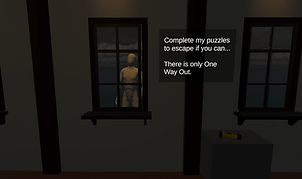
One Way Out is a VR escape room experience where the player is placed in a room with puzzles as they must attempt to escape. However, there is something outside watching them… This game combines simple puzzles with a horror environment to create an eerie atmosphere for the player to escape.
The game contains 2 main puzzles, the first is where you find 4 riddles on the wall under some shelves. The answers to each of these riddles are weapons that are around the room. The player must match the correct weapon to the shelf by picking it up and placing it in the slot. After all 4 weapons are correctly placed, 2 items will be revealed. A key to the next puzzle, and a red square (representing a piece of a photo). The photo goes into a frame that sits next to the door that is used to escape. The key goes into a lock that unlocks the next puzzle.
The next puzzle is a “Simon Says” puzzle where the player must press the correct buttons in the correct order to complete the puzzle. They must complete the sequence as it gets more complicated 5 times. After completing this, the player is given another red box (representing the other piece of the photo). After placing this second piece in the frame, the player is given the win screen text, signifying that they have completed the game.
I believe that this game is unique in the way that it is a simple experience that is aimed at players who may not be as familiar with VR and can complete these simple puzzles quite easily. The intent is to create an eerie environment to unsettle players, while not necessarily challenging them too hard with the puzzles.
Puzzle
VR
Horror
Technical Implementation
Tools: Unity 2022.3.62f2, XR Toolkit
Motion Capture: Motion Capture animations were used for the movement of the villain character and are triggered based on progress throughout the experience.
Key Features:
-
Matching puzzle using XR sockets
-
"Simon Says" challenge using buttons that interact using XR controls
-
Audio triggers that play sound effects when placing things in correct slots or pressing buttons
-
Animations that play based on triggers
-
Working flashlight
-
UI text appears in certain areas of the world
Challenges:
-
Learning Unity scripting (this is the first project that I have completed using Unity that was not following step-by-step tutorials)
-
Learning complex Unity features (animation controllers, lighting, etc...)
-
Managing the scope of my project to fit within the time constraints of the assignment
-
Due to the time constraints of the project, I had to use AI to help with certain scripting elements (per my professor's instruction)
Role: Solo Developer
Developer Walkthrough: Link
Trailer: Link
Software used: Unity VR (Meta Quest 3)
Language: C#
Duration: 3-5 Minutes
Genre: Horror, Puzzle
Target Platform: Meta Quest 3
Genre: Puzzle / Horror
Year made: 2025
Published: No
Development Reflection
What I have learned:
I have had the opportunity to learn quite a bit about how Unity works and scripting in C#. It has been challenging to learn this new environment when I am so used to Unreal Engine, but I have found it to be a great learning experience.
What I would do differently:
Due to the intense schedule of this assignment and the time constraint, I had to utilize AI tools to help with scripting. I am very against doing this (this is also why I will not be publishing the game on any platform) and I wish that I would have not had to do that. Next time I would hope that I would be given the time to learn this new engine and techniques to complete the project using only my own work.
Future Development Ideas:
I do not plan to continue development on this project. However, if I did I may make things more polished. I would put in environmental assets to decorate and spruce up the room. I would also add more animations to the character to make him feel more scary.
Developer Walkthrough